Time tracking for offices
without hardware or complications
Remote work, flexible hours, hybrid working... Your office isn't 9-to-6 like before. Cleverfy adapts to it. Browser clocking, Chrome extension and differentiated in-person/remote records.
The modern office needs modern time tracking
Access turnstiles, paper records and shared spreadsheets no longer work for teams that work hybrid.
Hybrid remote work without control
Some days at the office, others at home. Who is where? Are the hours being met? The Remote Work Law requires differentiated records and many companies don't do it.
Flexible hours without records
Having each employee start when they want is fine, but it needs to be recorded. With flexible hours, paper records simply don't work.
You don't want clocking hardware
Your office doesn't need a turnstile or fingerprint reader. You need something that works from the laptop each employee already has.
Scattered and unreliable data
Each manager keeps their own Excel, hours don't add up and when payroll comes around you have to reconstruct half the team's working day.
Cleverfy integrates into your daily routine without friction
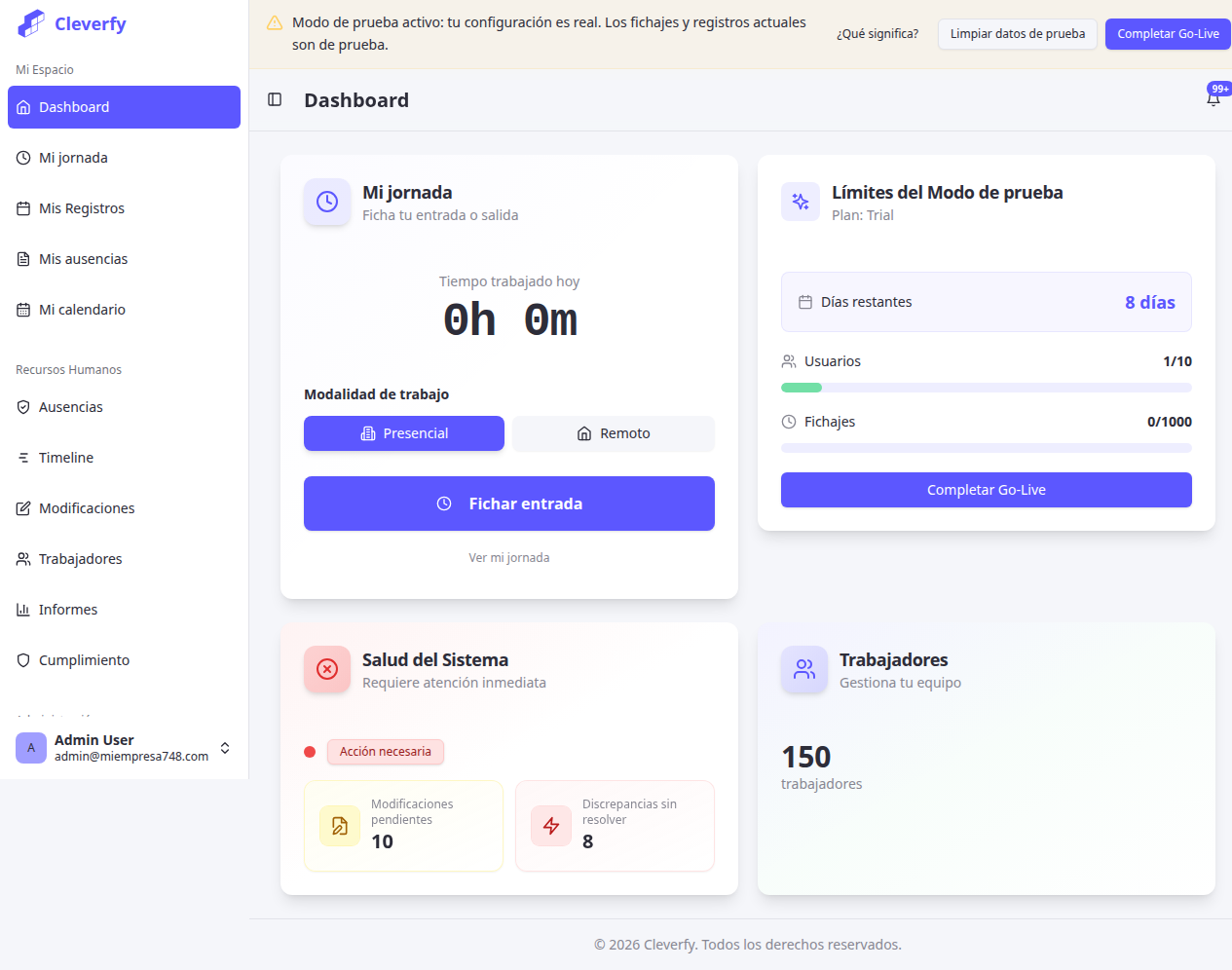
Clock in with one click, from the laptop you already use. No installation, no hardware, no changing your routines.
Browser clocking
No installation needed. Each employee opens Cleverfy in Chrome, Firefox or Safari and clocks in with one click. Works on the office laptop and the home one.
Chrome extension
One click in the browser bar and you've clocked in. Without opening another tab, without searching for the URL. The fastest way to record your working day.
Differentiated remote work
The system automatically distinguishes between in-person and remote working days. Complies with Law 10/2021 on Remote Work without complicated setups.
Flexible hours compatible
Define working day by hours (8h/day) instead of fixed schedule. Cleverfy calculates if it's met regardless of when each person comes and goes.
Real-time dashboard
See who's working right now, who has clocked in today and who hasn't. Complete overview of your team from a single panel.
Reports for HR and accountant
Export monthly reports with totals, overtime and in-person/remote breakdown. Ready for payroll without tweaking.
Remote work is a reality — your records must reflect it
Law 10/2021 on Remote Work and the Royal Decree on working time recording require differentiation. These numbers put it in context.
In Spain are compatible with remote work
With hybrid model expect to grow in 2025 (IWG)
Needed with Cleverfy
From browser or Chrome extension
In-person, remote or hybrid — all recorded
Law 10/2021 requires that time records differentiate between in-person and remote work. Cleverfy does it automatically, without your team having to think about it.
- ✓ Automatic in-person / remote differentiation
- ✓ Compatible with flexible hours (recording by hours, not fixed schedule)
- ✓ Chrome extension for instant clocking from laptop
- ✓ Reports with in-person vs remote breakdown per employee
- ✓ Complies with current regulations + Law 10/2021 on Remote Work
Running before the first coffee
Create your account
Sign up in 2 minutes. No credit card, no commitment.
Invite your team
Send email invitations. Each employee accesses from their usual browser.
Clock in with one click
From the browser or Chrome extension. One click to enter, another to leave. Done.
You only pay per user, nothing else
No server licenses, no terminals, no maintenance. Cleverfy works from the browser you already have.
€699
Up to 10 employees
One-time payment · Forever
€2,099
Up to 30 employees
One-time payment · Forever
€5,699
Up to 80 employees
One-time payment · Forever
Subscription from €1.50/employee/month · Basic or Pro plan — pay for what you need · No commitment
Frequently asked questions about office time tracking
How do employees who work remotely clock in? ▼
Exactly the same as at the office: from the browser or Chrome extension. The system automatically distinguishes whether the clock-in is in-person or remote based on the configuration. They don't need to install anything special, just open Cleverfy in their usual browser.
Does it work with flexible schedules where everyone starts at a different time? ▼
Yes. Cleverfy records the actual entry and exit time of each employee. You can define an expected working day (for example, 8 hours daily) and the system calculates if it's been met, regardless of when each person started.
Do I need to install hardware like turnstiles or clocking machines? ▼
No. Cleverfy works 100% from the browser, mobile app or Chrome extension. You don't need any additional hardware. This makes it ideal for offices where it doesn't make sense to install an access turnstile.
How do I know if an employee is working from home or from the office? ▼
Cleverfy automatically differentiates between in-person and remote work. The employee indicates the type of work when clocking in, and the system records it separately. This complies with the Remote Work Law (Law 10/2021) which requires differentiating both modalities.
Can I export data for payroll or HR? ▼
Yes. You can export reports in Excel or PDF format with each employee's hours, overtime, monthly totals and in-person/remote breakdown. Ready to pass to your accountant or HR department.
What happens if an employee forgets to clock in? ▼
The employee can submit a correction request indicating the actual entry or exit time. This request is logged and requires manager approval. Everything is traced, as regulations require.
Your office, compliant with the law with just one click
14 days free · No credit card · No commitment